

- Wireless technology Wi-Fi

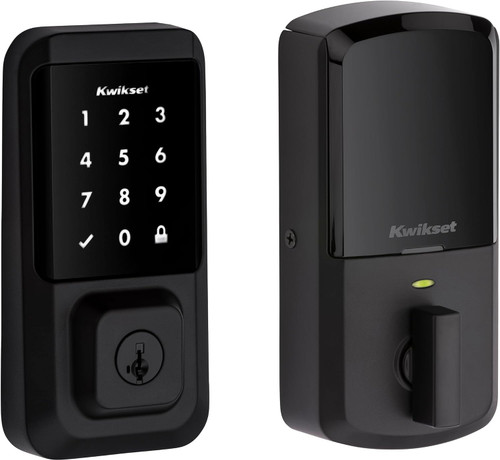
Halo Touchscreen 26, Wi-Fi, Polished Chrome
SKU KW-99390-003 Model 99390-003
- Touchscreen entry with up to 250 user codes, each one schedulable from the Kwikset app
- SecureScreen shows random digits before code entry to prevent fingerprint and code detection
- Wi-Fi direct to the router, no hub, with remote lock and unlock and event history in the app
- ANSI/BHMA Grade AAA with a 20-minute UL fire rating, fits doors 1-3/8 in to 2 in thick
- Fast shipping from four branches
- 30-day returns on unopened products
Product highlights
- ConnectivityWi-Fi, no hub required
- Storage250 user codes
- CompatibilityAlexa, Google Home, Brilliant
- Power4 AA batteries, included
- MountDoors 1-3/8 to 2 in thick
The Halo Touchscreen is a Wi-Fi touchscreen deadbolt with up to 250 user codes and no hub. It joins the customer's router directly and is managed from the Kwikset app anywhere there is an internet connection.
Why it fits the job
SecureScreen shows random digits before code entry, which prevents fingerprint and code detection on the touchscreen surface. The lock is ANSI/BHMA Grade AAA with a 20-minute UL fire rating and SmartKey Security, and it fits doors from 1-3/8 to 2 inches thick with an adjustable latch backset.
Key features
- Scheduled codes: up to 250 user codes that work anytime, within a date range, on set weekdays and times, or one time within 24 hours
- No hub: connects directly to home Wi-Fi, with remote lock and unlock, notifications and event history in the app
- Built-in protection: alarm after 3 consecutive incorrect codes, Secure Mode, and a tamper resistant interior cover
- One-touch locking: lock from the outside without entering a code
- Voice control: works with Amazon Alexa and Google Assistant with no hub required
- Re-keyable: SmartKey Security lets you re-key the lock yourself in seconds
How to sell it
Sell the code schedules. A housekeeper gets a weekday and time window, a vacation renter gets a date range, and a contractor gets a code that works once within 24 hours. Add SecureScreen for the customer who worries about smudges giving away the code, and the missing hub as the reason it is easy to install and easy to live with.
System requirements
A Wi-Fi router, an internet connection for remote access, and a smartphone with the Kwikset app. No hub is required. Kwikset notes that products using the Kwikset app only work in the United States and Canada.
Specifications
| SKU | KW-99390-003 |
|---|---|
| Brand | Kwikset |
| Form factor | Deadbolt, Contemporary style |
| Power input | 4 AA batteries, included |
| Communication notes | Connects directly to home Wi-Fi, no hub required |
| Compatibility notes | Amazon Alexa, Google Home (Google Assistant) and Brilliant. No hub required for voice control |
| Credentials | Touchscreen code and key |
| User codes | 250 |
| Door thickness | 1-3/8" to 2" |
| Backset options | Adjustable |
| Assembled dimensions | 5.6" H x 2.8" W x 1.2" L |
| Compliance | ANSI/BHMA Grade AAA, UL 20-minute fire rating |
| Antimicrobial finish | Microban |
| Body material | Metal |
| ADA compliant | No |
| Keys included | 2 |
| Finish | Polished chrome |