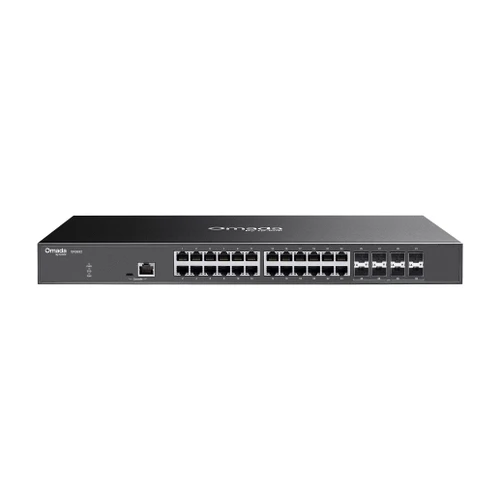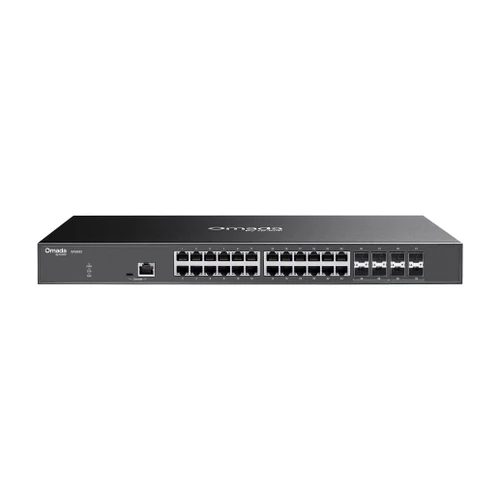




Omada 24-Port 10GBASE-T L2+ Managed Switch, 8 10G SFP+ Slots, Multi-Gig RJ45 with 1-Year Omada Device Support
SKU TPL-SX3832-S1 Model SX3832-S1
- 24 multi-gig RJ45 ports running 10M to 10G, plus 8 SFP+ slots at 1/10G
- 640 Gbps switching capacity with 240 Mpps forwarding and a 32K MAC table
- L2+ static routing, DHCP server, VLANs, ACLs and ERPS ring recovery
- Managed in Omada with zero-touch provisioning, or standalone by web UI and CLI
- Fast shipping from four branches
- 30-day returns on unopened products
Product highlights
- Ports24 x 10G RJ45, 8 x SFP+
- ConnectivityL2+ managed, cloud or standalone
- Power106.5 W max
- Mount19-inch rack
- Size17.3 x 8.7 x 1.7 in
This SKU is the SX3832 bundled with 1 year of Omada Device Support from TP-Link. The hardware is identical to the standalone SX3832.
The Omada SX3832 is a 24-port multi-gig L2+ managed switch whose RJ45 ports run from 10 Mbps up to 10 Gbps, plus eight 1/10G SFP+ slots and 640 Gbps of switching capacity. It connects 10G servers, NAS and workstations over copper and uplinks over fiber, managed in the same Omada site as the gateway and APs.
Built for 10G copper access and aggregation
Every RJ45 port auto-negotiates 10M, 100M, 1G, 2.5G, 5G or 10G, so existing cabling and a mix of old and new devices can share one switch. Static routing, a DHCP server, VLANs, ACLs and ERPS ring recovery cover the Layer 2 and light Layer 3 work. It has no PoE output.
Key features
- 24 multi-gig RJ45 ports: 10M to 10G auto-negotiation on every port
- Eight 1/10G SFP+ slots: fiber or DAC uplinks
- 640 Gbps switching: 240 Mpps forwarding and a 32K MAC table
- L2+ routing: 48 IPv4/IPv6 static routes and a DHCP server and relay
- Zero-touch provisioning: and batch firmware upgrades through the Omada Cloud-Based Controller
- Rack mount: rackmount kit included, with a physical security lock and 6 kV surge protection
System requirements
Centralized management needs an Omada Cloud-Based Controller, Hardware Controller or Software Controller; zero-touch provisioning needs the cloud controller. Without a controller the switch runs standalone from its web interface, CLI and SNMP. The SFP+ slots need separate modules or DACs. TP-Link recommends no more than two 10G RJ45 SFP+ modules, one per two sets of SFP+ slots.
Specifications
| SKU | TPL-SX3832-S1 |
|---|---|
| Brand | TP-Link |
| Form factor | 24-port multi-gig 10GBASE-T L2+ managed switch with 8 SFP+ slots, rack mount |
| Support plan | 1-year Omada Device Support (included) |
| Communication | Ethernet / IP |
| Power input | 100-240V AC, 50/60 Hz |
| Power consumption | 106.5 W max at 220V (104.9 W at 110V) |
| Management | L2+ Managed |
| Port speed | Fast Ethernet |
| Port speed | Gigabit |
| Port speed | 2.5G |
| Port speed | 10G |
| Works with | Omada |
| Ethernet ports | 24 x 10M/100M/1G/2.5G/5G/10G RJ45 |
| SFP slots | 8 x 1/10G SFP+ |
| Console ports | 1 x RJ45, 1 x USB Type-C |
| Switching capacity | 640 Gbps |
| Packet forwarding rate | 240 Mpps |
| MAC address table | 32K |
| Jumbo frame | 9 KB |
| VLANs | 4K 802.1Q VLANs, MAC, protocol, private and voice VLAN, GVRP, VLAN mapping and replace |
| L2+ features | 48 IPv4/IPv6 static routes, DHCP server and relay, link aggregation, STP, ERPS, loopback detection, IGMP and MLD snooping |
| Security | 802.1X with RADIUS, AAA with TACACS+, ACLs (MAC, IP, time-based), DHCP snooping, ARP inspection, port security, storm control, DoS defend, HTTPS and SSH management |
| Controller management | Omada Cloud-Based, Hardware and Software Controller; Omada app |
| Communication notes | Web GUI, CLI via console and Telnet, SNMP v1/v2c/v3, RMON, LLDP/LLDP-MED, sFlow, IPv6, dual image and dual configuration |
| Cooling | 2 fans |
| Surge protection | 6 kV |
| Mounting | 19-inch rack (rackmount kit included), physical security lock |
| Dimensions | 17.3 x 8.7 x 1.7 in (440 x 220 x 44 mm) |
| Operating temp | 23°F to 122°F (-5°C to 50°C) |
| Operating humidity | 10 to 90% RH, non-condensing |
| Compliance | CE, FCC |
| Package contents | SX3832, power cord, console cable, rackmount kit, rubber feet, quick installation guide |