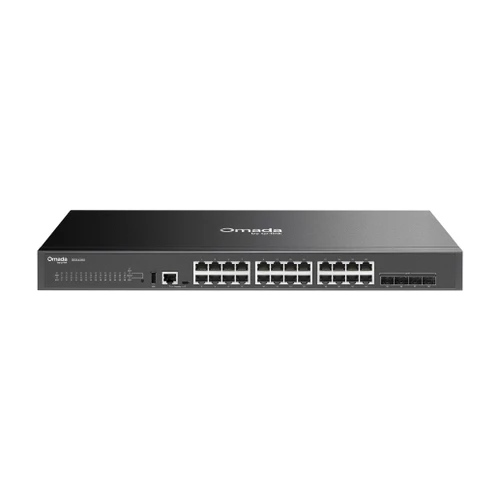


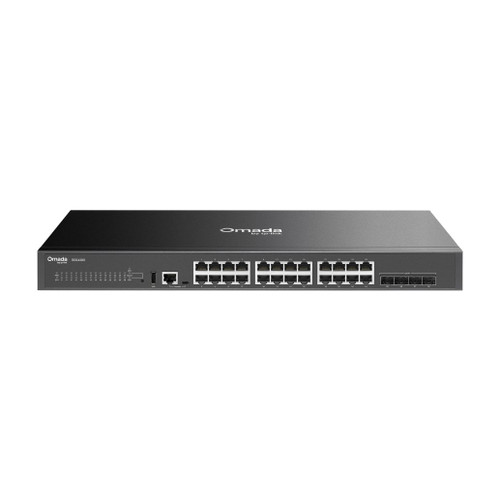


Omada 24-Port Gigabit Stackable Lite L3 Managed Switch with 4 10G SFP+ Slots, Fanless with 1-Year Omada Device Support
SKU TPL-SG5428X-S1 Model SG5428X-S1
- 24 Gigabit RJ45 ports with four 1/10G SFP+ slots that double as stacking ports
- Stack up to 4 units over the SFP+ slots, with up to 80 Gbps of stack bandwidth
- Lite L3 routing with static routes, RIP, OSPF and VRRP, plus ACLs and 802.1X
- Fanless at 19.9 W max, managed in Omada with zero-touch provisioning
- Fast shipping from four branches
- 30-day returns on unopened products
Product highlights
- Ports24 x Gigabit, 4 x SFP+
- ConnectivityLite L3, stackable
- Power19.9 W max, fanless
- Mount19-inch rack
- Size17.3 x 7.1 x 1.7 in
This SKU is the SG5428X bundled with 1 year of Omada Device Support from TP-Link. The hardware is identical to the standalone SG5428X.
The Omada SG5428X is a 24-port Gigabit stackable Lite L3 managed switch with four 10G SFP+ slots, built for small campus cores and distribution closets that need routing and stacking without a chassis switch. It is fanless and shallow at 7.1 inches deep.
Built for compact distribution and small cores
Lite L3 features include static routing, RIP, OSPF, VRRP and a DHCP server, so the switch can route between VLANs at the closet. Up to four units stack over the SFP+ slots with 80 Gbps of stack bandwidth. Manage it from an Omada controller or standalone through the web UI, CLI and SNMP.
Key features
- Four 1/10G SFP+ slots: uplinks or stacking ports, up to 80 Gbps of stack bandwidth
- Physical stacking: up to 4 units as one logical switch
- Lite L3 routing: static routes, RIP, OSPF, VRRP and a DHCP server
- Fanless design: no fan noise, 19.9 W maximum power draw
- Security: 802.1X, ACLs, DHCP snooping, ARP inspection and port security
- Zero-touch provisioning: through the Omada Cloud-Based Controller
System requirements
Centralized management needs an Omada Cloud-Based Controller (built-in version 5.15.22 or later), or an Omada hardware or software controller (5.15.20 or later); zero-touch provisioning needs the cloud-based controller. Without a controller the switch runs standalone from its web interface and CLI.
Specifications
| SKU | TPL-SG5428X-S1 |
|---|---|
| Brand | TP-Link |
| Form factor | 24-port Gigabit stackable Lite L3 managed switch with 4 SFP+ slots, rackmount |
| Support plan | 1-year Omada Device Support (included) |
| Communication | Ethernet / IP |
| Power input | 100-240V AC, 50/60 Hz |
| Power consumption | 19.9 W max at 110V/60 Hz |
| Management | L3 Managed |
| Port speed | Gigabit |
| Port speed | 10G |
| Works with | Omada |
| Ethernet ports | 24 x 10/100/1000 Mbps RJ45 |
| SFP slots | 4 x 1/10G SFP+ |
| Console ports | 1 x RJ45, 1 x USB Type-C |
| USB | 1 x USB 2.0 |
| Switching capacity | 128 Gbps per unit |
| Packet forwarding rate | 95.23 Mpps |
| MAC address table | 16K |
| Jumbo frame | 9 KB |
| Stacking | Up to 4 units; any SFP+ slot can stack, up to 80 Gbps stack bandwidth |
| VLANs | 4K 802.1Q VLANs, MAC (60 entries), protocol, voice, private and multicast VLAN, QinQ, GVRP |
| L3 features | Static routing (512 IPv4, 128 IPv6 routes), RIP v1/v2, OSPF v2/v3, VRRP, DHCP server and relay |
| L2 features | Link aggregation, STP, ERPS, loopback detection, mirroring with RSPAN, IGMP and MLD snooping, MVR |
| Security | 802.1X with RADIUS and TACACS+ AAA, ACLs, DHCP snooping, ARP inspection, IP-MAC-port binding, port security, DoS defend, HTTPS and SSH management |
| Controller management | Omada Cloud-Based (v5.15.22+), hardware or Software Controller (v5.15.20+); Omada app |
| Communication notes | Web GUI, CLI via console and Telnet, SNMP v1/v2c/v3, RMON, LLDP/LLDP-MED, IPv6, dual image and dual configuration |
| Cooling | Fanless |
| Mounting | 19-inch rack (mounting brackets, screws and rubber feet included) |
| Dimensions | 17.3 x 7.1 x 1.7 in (440 x 180 x 44 mm) |
| Operating temp | 23°F to 113°F (-5°C to 45°C) |
| Operating humidity | 10 to 90% RH, non-condensing |
| Compliance | CE, FCC |
| Package contents | SG5428X, power cord, console cable, mounting brackets, screws, rubber feet, quick installation guide |