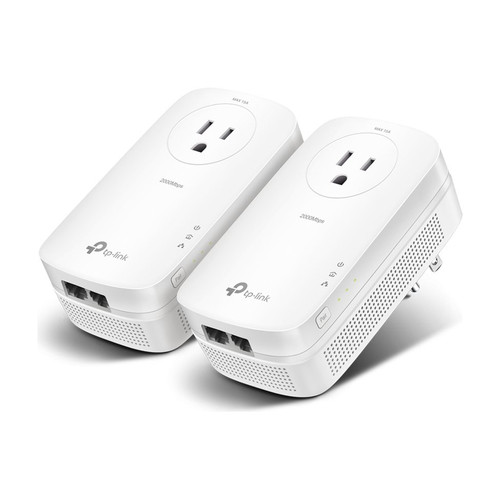



AV1000 Gigabit Passthrough Powerline Starter Kit with AC Pass-Through Outlets
SKU TPL-TL-PA7017P KIT Model TL-PA7017P KIT
- Fast shipping from four branches
- 30-day returns on unopened products
The TL-PA7017P KIT is a Gigabit powerline pair with AC pass-through, so each adapter leaves its wall outlet free for another device. That matters where outlets are scarce, such as behind a TV or an NVR rack. The kit includes two TL-PA7017P adapters and two Ethernet cables.
Built for wired runs without new cable
Plug one adapter next to the router and the other where the wired connection is needed, then pair them with the Pair button using 128-bit AES encryption.
Key features
- AC pass-through socket: keeps the wall outlet usable
- Gigabit Ethernet port on each adapter: for wired devices
- Powerline range: up to 300 meters (1000 feet) over the electrical circuit, per TP-Link
- HomePlug AV2 and IEEE 1901: standards-based powerline
- Works with other powerline gear: compatible with any powerline adapters, extenders and routers
System requirements
Works with Windows, Mac and Linux computers.
Specifications
| SKU | TPL-TL-PA7017P KIT |
|---|---|
| Brand | TP-Link |
| Form factor | Wall-plug passthrough powerline adapter kit (2 adapters) |
| Communication | Ethernet / IP |
| Power consumption | 2.54W maximum, 2.05W typical, 0.83W standby |
| Port speed | Gigabit |
| Ethernet ports | 1 x Gigabit per adapter |
| AC pass-through | Power socket on each adapter |
| Standards and protocols | HomePlug AV2, HomePlug AV, IEEE 1901, IEEE 802.3, 802.3u, 802.3ab |
| Plug type | US |
| Powerline range | Up to 1000 ft (300 m) over the electrical circuit |
| Modulation | OFDM (PLC) |
| Encryption | 128-bit AES |
| Buttons | Pair |
| LED | Power, Powerline, Ethernet |
| Compatibility notes | Compatible with any powerline adapters /extenders and routers. Windows 2000/XP/2003/Vista, Windows 7/8/8.1/10, Mac, Linux |
| Dimensions | 2.3 x 1.7 x 3.7 in (58 x 42 x 95 mm) per adapter |
| Operating temp | 32°F to 104°F (0°C to 40°C) |
| Operating humidity | 10 to 90%, non-condensing |
| Compliance | FCC, UL |
| Package contents | 2 x TL-PA7017P, 2 x Ethernet cables, quick installation guide |
More in Data Comm & Networking
All Data Comm & Networking-
TP-Link
TP-Link | AV2000 2-Port Gigabit Passthrough Powerline Adapter Starter Kit | TL-PA9020P KIT
TPL-TL-PA9020P KIT -
TP-Link
TP-Link | AV600 Powerline Starter Kit with 2 Adapters and 10/100 Ethernet Ports | TL-PA4010 KIT
TPL-TL-PA4010 KIT -
TRENDnet
TRENDnet | 500 AV Compact Powerline Adapter Kit /w Pass Through (TN-TPL-407E2K)
TN-TPL-407E2K -
TP-Link
TP-Link | 5-Port Gigabit Desktop Switch, Unmanaged, Fanless, Plug and Play | TL-SG1005D
TPL-TL-SG1005D