

- Frequency Jeweller

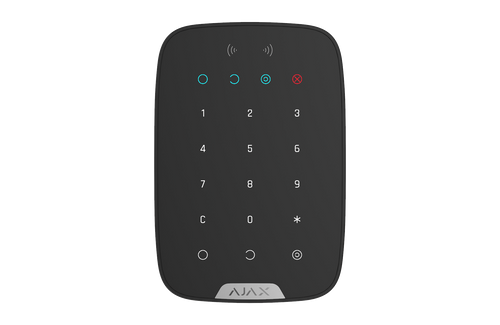
KeyPad Jeweller Wireless Touch Keypad with Duress Codes, White
SKU AJ-42814
- Fast shipping from four branches
- 30-day returns on unopened products
A capacitive touch keypad supporting up to 200 personal access codes, one per user, plus a separate duress code set. It is the control point for users who will not carry a fob or use an app.
Built for the installer
Duress codes are the feature worth explaining at the sale. Entering the duress code disarms the system normally while silently signalling the central station, so someone forced to disarm under threat can comply visibly and still raise an alarm. Each user can have their own.
There is also a set of up to 99 codes for unregistered people, useful for cleaners and contractors, and group security management so a code can control one area rather than the whole site. Protection against code guessing locks out brute-force attempts. Classified ACE type B.
Key features
- Up to 200 personal codes, one per user, so the log attributes every arming
- Duress codes disarm normally while silently signalling the central station
- Up to 99 codes for unregistered people such as cleaners and contractors
- Group security management so a code controls one area rather than the whole site
- Protection against code guessing blocks brute-force attempts
System requirements
Requires an Ajax hub or range extender. Indoor use only. The number of personal codes available depends on the hub model.
Specifications
| SKU | AJ-42814 |
|---|---|
| Brand | AJAX |
| Radio communication range | Up to 5,500 ft in open space, between the device and a hub or range extender |
| Keypad type | Capacitive touch |
| Access codes | Up to 200 personal codes plus 1 keypad code |
| Duress codes | Up to 200 personal duress codes plus 1 keypad duress code |
| Codes for unregistered people | Up to 99 personal codes |
| Group management | General keypad code plus group ID to manage group security |
| Functional button | Configurable as alarm, mute fire alarm, or off |
| Anti-tamper | Protection against code guessing, tamper alarm |
| ACE type | Type B |
| Use environment | Indoor use only |
| Power input | 4 x AAA, pre-installed |
| Battery life | Up to 2 years |
| Colour | White |
| Region | 9NA, North America model |
| Radio protocol | Jeweller, two-way encrypted wireless |
| Frequency band (North America) | 905.0-926.5 MHz, certified to UL/ULC standards |
| Radio modulation | GFSK with frequency hopping |
| Encryption | Block encryption with a dynamic key |
| Communication loss detection | After 36 seconds |
| Anti-spoofing | Device authentication |
| Warranty | 24 months |
| Frequency | Jeweller |