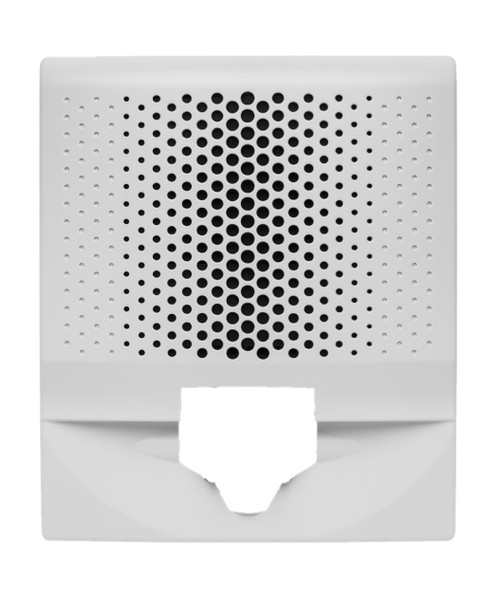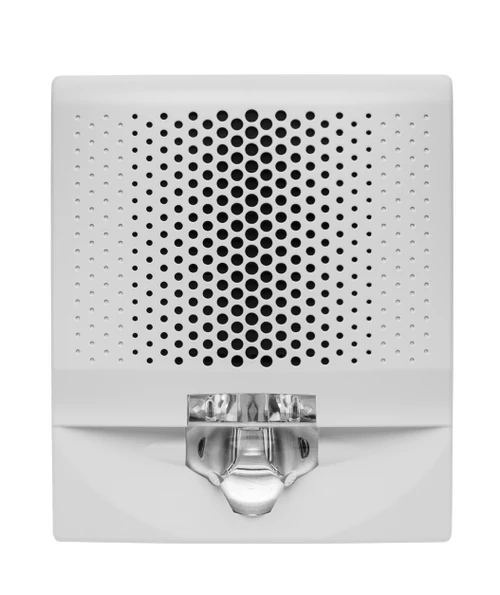


Genesis LED EG4 Series Replacement Cover for Wall Speaker/Strobe, White, FIRE Marking
SKU KD-EG4SVWF-CVR
- Fast shipping from four branches
- 30-day returns on unopened products
The Genesis LED EG4 replacement cover drops onto any EG4 Series wall-mount speaker/strobe appliance, replacing a damaged cover or converting markings in the field. White finish with bold FIRE lettering. No tools required beyond a flat-blade screwdriver to pop the old cover and snap the new one in place.
When you need it
Damaged cover on an otherwise working appliance. Code-required marking change from plain to FIRE (or vice versa). Color conversion from red to white. The cover is the same part across all EG4 wall-mount speaker/strobe configurations, so one SKU handles every EG4SV variant in the field.
Key features
- Quick-swap design: snaps onto the EG4 appliance base without removing the device from the wall
- FIRE marking: meets code requirements for spaces that mandate visible lettering on notification appliances
- White finish: matches white Genesis LED EG4 wall-mount appliances
- Speaker grille and strobe lens integrated: cover includes the perforated speaker grille and strobe lens cutout in one piece
Specifications
| SKU | KD-EG4SVWF-CVR |
|---|---|
| Brand | Kidde Commercial |
| Form factor | Replacement snap-on cover for Genesis LED EG4 wall-mount notification appliance |
| Color | White |
| Marking | FIRE |
| Compatibility | Genesis LED EG4 Series wall-mount speaker/strobe, horn/strobe, strobe, speaker, and horn appliances |
| Compliance | UL listed, ULC listed |
Documents and resources
FAQs
Does this cover fit all Genesis EG4 wall-mount models?
Yes. The cover is compatible with all Genesis LED EG4 Series wall-mount notification appliances, including speaker/strobe, horn/strobe, strobe-only, speaker-only, and horn-only configurations.
Can I swap the cover without removing the device from the wall?
Yes. Use a flat-blade screwdriver to release the cover from the appliance base. The new cover snaps into place. No need to disconnect wiring or remove the mounting plate.
Does changing the cover affect the strobe candela setting?
No. The candela selector switch is on the appliance body underneath the cover. Your existing setting stays in place.
Can I use this to convert from plain to FIRE marking?
Yes. Swapping covers is the intended method for changing markings in the field. Order the cover with the marking you need (FIRE or plain) in the color you need (white or red).
More in Fire Speakers
All Fire Speakers-
Kidde Commercial
Kidde | Genesis LED EG4 Series Replacement Wall Strobe Cover, White, FIRE Marking | EG4VWF-CVR
KD-EG4VWF-CVR -
Kidde Commercial
Kidde | Genesis LED EG4 Series Wall-Mount Speaker-Strobe Cover, White, FIRE Marking | EG4AVWF-CVR
KD-EG4AVWF-CVR -
Kidde Commercial
Kidde | Genesis LED EG4 Series Wall Speaker Replacement Cover, White with FIRE Marking | EG4SWF-CVR
KD-EG4SWF-CVR -
Kidde Commercial
Kidde | Genesis LED EG4 Wall Mount Speaker/Strobe, 15-110cd Selectable, White, FIRE Marking | EG4SVWF
KD-EG4SVWF -
Kidde Commercial
Kidde | Genesis LED EG4 Series Replacement Cover for Wall Mount Speaker/Strobe, White, No Marking | EG4SVWN-CVR
KD-EG4SVWN-CVR