


- Wireless technology Wi-Fi

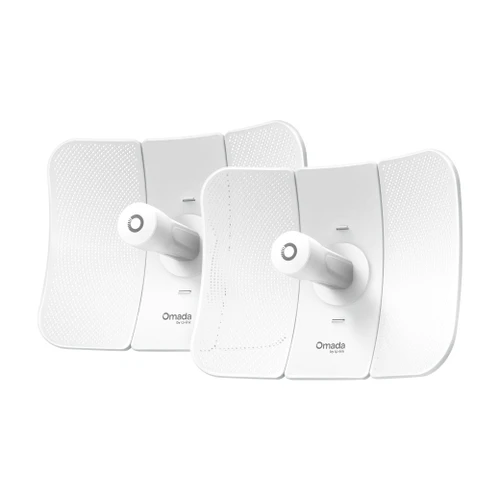
Omada 5 GHz AC867 Indoor/Outdoor Wireless Bridge KIT, 3 Gigabit Ports, 1 km PtP/PtMP, IP65
SKU TPL-EAP211-Bridge KIT Model EAP211-Bridge KIT
- Preconfigured 5 GHz AC867 bridge KIT for links up to 1,000 m (0.62 mi)
- Wide 60° x 30° beam, up to 1:4 multi-bridge connections for distributed cameras
- Three Gigabit ports, powers from 12V DC, 802.3af PoE or 24V passive PoE
- IP65 enclosure rated -40°F to 158°F, managed standalone or through Omada SDN
- Fast shipping from four branches
- 30-day returns on unopened products
Product highlights
- Range1,000 m (0.62 mi)
- Connectivity5 GHz AC, up to 867 Mbps
- Ports3 x Gigabit RJ45
- PoE802.3af, passive PoE or 12V DC
- Weather ratingIP65
The Omada EAP211-Bridge KIT is a preconfigured 5 GHz AC867 wireless bridge KIT for short-to-medium links, up to 1,000 m (0.62 mi), where a wider beam helps cover distributed cameras.
Built for distributed cameras
The EAP211 uses 10 dBi internal antennas with a 60° horizontal and 30° vertical beamwidth, so one main bridge can serve up to four bridges in a point-to-multipoint layout. The KIT is preconfigured for auto-pairing out of the box: set the role switch and press the pair button, with no login. Each unit has three Gigabit Ethernet ports for cameras and devices, and runs from 12V DC (solar-compatible), 802.3af PoE or 24V passive PoE.
Key features
- Up to 1,000 m (0.62 mi): 5 GHz 802.11ac link at up to 867 Mbps
- Preconfigured KIT: auto-pairs out of the box, and supports up to 1:4 multi-bridge connections
- Wide 60° x 30° beam: suits point-to-multipoint layouts with distributed cameras
- Three Gigabit ports: connects more cameras and devices without an extra switch at the remote end
- Flexible power: 12V DC, 802.3af PoE or 24V passive PoE, passive PoE adapter in the package
- IP65, -40°F to 158°F: weatherproof enclosure, pole mounting accessories included
System requirements
Cloud access and centralized management need an Omada controller: Omada Cloud-Based Controller, hardware or Software Controller. Pairing with the Pair button needs a firmware upgrade, and wall mounting accessories are sold separately. Rates are physical-layer maximums from the 802.11 specification; actual throughput and range vary with the environment.
Specifications
| SKU | TPL-EAP211-Bridge KIT |
|---|---|
| Brand | TP-Link |
| Form factor | 5 GHz AC867 indoor/outdoor wireless bridge KIT |
| Communication | Ethernet / IP |
| Power input | 12V DC (12V ±10%), 802.3af PoE or 24V passive PoE; passive PoE adapter included |
| Power consumption | 11.5 W max |
| Wi-Fi standard | Wi-Fi 5 |
| PoE | 802.3af PoE |
| PoE | Passive PoE |
| Port speed | Gigabit |
| Works with | Omada |
| Ethernet ports | 3 x Gigabit Ethernet |
| Wireless standards | IEEE 802.11a/n/ac on 5 GHz |
| Wireless speed | Up to 867 Mbps on 5 GHz |
| Transmission distance | 1,000 m (0.62 mi) |
| Antennas | Internal 2x2 dual-polarized directional MIMO, 10.0 dBi on 5 GHz |
| Antenna beamwidth | Horizontal 60°, vertical 30° |
| Weather rating | IP65 |
| SSIDs | 8 |
| Wireless security | VLAN, rogue AP detection, up to 4,000 MAC filter entries, wireless encryption |
| Controller management | Omada Cloud-Based Controller, Omada hardware controller or Omada Software Controller; Omada app |
| Communication notes | PtP and PtMP (up to 1:4 multi-bridge connections); zero-touch provisioning; role DIP switch |
| Mounting | Pole mounting (accessories included); wall mounting accessories sold separately |
| Dimensions | 3.1 x 2.4 x 8.8 in (79 x 60 x 224 mm) |
| Operating temp | -40°F to 158°F (-40°C to 70°C) |
| Operating humidity | 10 to 90% RH, non-condensing |
| Compliance | CE, FCC, RoHS |
| Package contents | EAP211-Bridge KIT, installation guide, mounting kit, passive PoE adapter |
Documents and resources
FAQs
How far does the EAP211-Bridge KIT reach?
How is it different from the EAP215-Bridge KIT?
How can it be powered?
Does the pair work out of the box?
Does wall mounting hardware come in the box?
More in Access Points
All Access Points-
TP-Link
TP-Link | Omada 5 GHz 867 Mbps Ultra-Range Wireless Bridge KIT, 23 dBi, 15 km PtP, IP65, 802.3af PoE | Beam Bridge 5 UR KIT
TPL-Beam Bridge 5 UR KIT