




- Wireless technology Wi-Fi

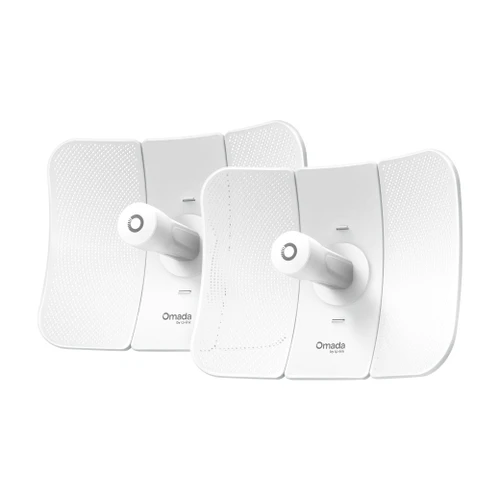
Omada 5 GHz 867 Mbps Ultra-Range Wireless Bridge KIT, 23 dBi, 15 km PtP, IP65, 802.3af PoE
SKU TPL-Beam Bridge 5 UR KIT Model Beam Bridge 5 UR KIT
- Preconfigured 5 GHz KIT for point-to-point links up to 15 km (9.3 mi) at up to 867 Mbps
- 23 dBi dual-polarized directional antennas with a 9° x 7° beamwidth
- Powers over 802.3af PoE or 24V/48V passive PoE, passive PoE adapter included
- IP65 enclosure, pole mount kit in the box, managed standalone or through Omada SDN
- Fast shipping from four branches
- 30-day returns on unopened products
Product highlights
- RangeUp to 15 km (9.3 mi)
- Connectivity5 GHz, up to 867 Mbps
- PoE802.3af or passive PoE
- Weather ratingIP65
- Ports1 x Gigabit RJ45
The Omada Beam Bridge 5 UR KIT is a preconfigured 5 GHz bridge KIT for point-to-point links of up to 15 km (9.3 mi). TP-Link points it at construction and mining sites, islands, and power towers and substations, the places where a camera or sensor feed has to travel a long way and no cable is going in.
Built for long point-to-point runs
Each bridge has a 23 dBi dual-polarized directional antenna with a 9° horizontal and 7° vertical beamwidth, and links at up to 867 Mbps on 5 GHz. You power on both bridges, wire one into the network as the main bridge, set it up in the Omada app or web UI, then configure the sub-bridge and aim it using the LED signal indicators and the app's alignment and speed-test tools. Power goes in through the single Gigabit port: 802.3af PoE or 24V/48V passive PoE, with a passive PoE adapter in the box.
Key features
- Up to 15 km (9.3 mi): ultra-range 5 GHz link at up to 867 Mbps
- 23 dBi directional antennas: narrow 9° x 7° beam for long, clean point-to-point shots
- One cable for power and data: 802.3af PoE or 24V/48V passive PoE on a single Gigabit port, passive PoE adapter included
- App-guided alignment: LED signal indicators plus Omada app alignment and speed testing to verify the link at install
- IP65 and 6 kV protection: weatherproof enclosure with ±6 kV Ethernet lightning protection, pole mounting kit included
- Omada SDN ready: zero-touch provisioning and batch deployment of bridge pairs from an Omada controller
System requirements
Standalone setup runs from the web UI or the Omada app. Cloud access, centralized management and batch provisioning need an Omada controller: Omada Central (cloud-based), an Omada hardware controller or the Omada Software Controller. Rates are physical-layer maximums from the 802.11 specification; actual throughput and range vary with the environment.
Specifications
| SKU | TPL-Beam Bridge 5 UR KIT |
|---|---|
| Brand | TP-Link |
| Form factor | 5 GHz ultra-range outdoor wireless bridge KIT |
| Communication | Ethernet / IP |
| Power input | 802.3af PoE or 24V/48V passive PoE on the Gigabit port; passive PoE adapter included |
| Power consumption | 15.8 W max |
| Wi-Fi standard | Wi-Fi 5 |
| PoE | 802.3af PoE |
| PoE | Passive PoE |
| Port speed | Gigabit |
| Works with | Omada |
| Ethernet ports | 1 x 10/100/1000 Mbps Gigabit RJ45 (PoE in) |
| Wireless standards | IEEE 802.11a/n/ac on 5 GHz |
| Wireless speed | Up to 867 Mbps on 5 GHz |
| Channel width | 20 / 40 / 80 MHz on 5 GHz |
| Transmission distance | 15 km (9.3 mi) |
| Antennas | External 2x2 dual-polarized directional MIMO, 23 dBi on 5 GHz |
| Antenna beamwidth | Horizontal 9°, vertical 7° |
| Weather rating | IP65 |
| Concurrent clients | Up to 8 associated stations |
| Wireless security | VLAN, rogue AP detection, up to 4,000 MAC filter entries, wireless encryption |
| Controller management | Omada Central (cloud-based), Omada hardware controller or Omada Software Controller; Omada app |
| Communication notes | PtP; SNMP, SSH, web UI, email alerts, zero-touch provisioning, speed test and antenna alignment tools |
| Mounting | Pole mounting (kit included) |
| Dimensions | 14.4 x 11.0 x 8.1 in (366 x 280 x 207 mm) |
| Operating temp | -40°F to 158°F (-40°C to 70°C) |
| Operating humidity | 10 to 90% RH, non-condensing |
| Compliance | CE, FCC |
| Package contents | Beam Bridge 5 UR KIT, installation guide, mounting kit, passive PoE adapter, power cord |
FAQs
How far can the Beam Bridge 5 UR KIT link?
How is it powered?
Do I need an Omada controller?
What mounting is included?
How do I aim the link?
More in Access Points
All Access Points-
TP-Link
TP-Link | Omada 5 GHz AC867 Indoor/Outdoor Wireless Bridge KIT, 3 Gigabit Ports, 1 km PtP/PtMP, IP65 | EAP211-Bridge KIT
TPL-EAP211-Bridge KIT


