

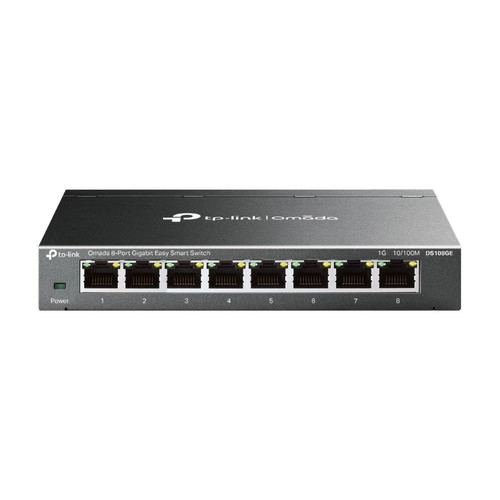


Omada 8-Port Gigabit Easy Smart Desktop Switch with VLAN and QoS, Wall Mountable
SKU TPL-DS108GE Model DS108GE
- 8 Gigabit RJ45 ports with 16 Gbps switching and web GUI or Windows utility setup
- Up to 32 VLANs from 4K IDs plus port, 802.1p and DSCP QoS priority
- Fanless case, powered by a 5 V adapter, desktop or wall mount
- Standalone Easy Smart switch: not managed by the Omada controller
- Fast shipping from four branches
- 30-day returns on unopened products
Product highlights
- Ports8 x Gigabit RJ45
- ConnectivityEasy Smart, 32 VLANs
- MountDesktop or wall
- Size6.2 x 4.0 x 1.0 in, fanless
The DS108GE is an 8-port Gigabit Easy Smart desktop switch for small jobs that need a few VLANs or traffic priorities without stepping up to a full managed switch. It runs from a 5 V adapter in a compact steel case.
Built for small sites that need light management
Configure it through the web GUI or the Windows Easy Smart Configuration Utility. Separate camera, voice and guest traffic with VLANs, prioritize with port, 802.1p or DSCP QoS, mirror a port to troubleshoot, and run cable diagnostics on a questionable drop. It does not join an Omada controller, so plan it as a standalone switch.
Key features
- 8 Gigabit ports: with 16 Gbps switching capacity
- VLANs on demand: up to 32 VLANs using MTU, port-based or 802.1Q modes
- QoS and storm control: four priority queues, rate limit and storm control
- L2 troubleshooting tools: port mirroring, cable diagnostics and loop prevention
- Fanless, wall mountable: desktop or wall mounting with no fan noise
System requirements
Uses the included 5 V DC power adapter. The Easy Smart Configuration Utility runs on Microsoft Windows; the web GUI needs only a browser.
Specifications
| SKU | TPL-DS108GE |
|---|---|
| Brand | TP-Link |
| Form factor | 8-port Gigabit Easy Smart desktop switch |
| Communication | Ethernet / IP |
| Power input | External adapter, 5 V DC / 0.6 A (included) |
| Power consumption | 3.68 W max (220 V/50 Hz) |
| Management | Easy Smart |
| Port speed | Gigabit |
| Ethernet ports | 8 x 10/100/1000 Mbps RJ45, auto MDI/MDIX |
| Switching capacity | 16 Gbps |
| Packet forwarding rate | 11.9 Mpps |
| MAC address table | 4K |
| Jumbo frame | 16 KB |
| VLANs | Up to 32 VLANs (out of 4K IDs): MTU, port-based and 802.1Q |
| L2 features | IGMP snooping, static link aggregation, port mirroring, cable diagnostics, loop prevention |
| Controller management | Not supported. Does not support Omada SDN central management. |
| Communication notes | Web GUI and Easy Smart Configuration Utility (Windows); port/802.1p/DSCP QoS, 4 priority queues, rate limit, storm control |
| Cooling | Fanless |
| Mounting | Desktop or wall mount |
| Dimensions | 6.2 x 4.0 x 1.0 in (158 x 101 x 25 mm) |
| Operating temp | 32°F to 104°F (0°C to 40°C) |
| Operating humidity | 10 to 90% RH, non-condensing |
| Compliance | FCC, CE, RoHS |
| Package contents | DS108GE, power adapter, installation guide |