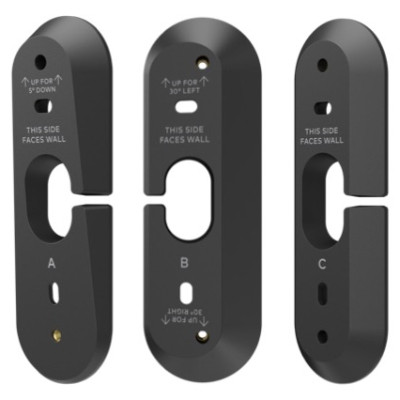



PoE Video Door Station Wedge Mount Kit for ADC-VDB755P
SKU ADC-VDBA-755P-WMK
- Fast shipping from four branches
- 30-day returns on unopened products
Two additional wedge types for the ADC-VDB755P, for the entries where the standard mounting angle does not reach. The extra wedges allow more extreme left and right pan for walls perpendicular to the door, plus tilt and pan combinations that push the vertical field toward the ground.
Built for the installer
The two problems this solves are the recessed entry, where the only mounting surface faces away from the visitor, and the blind spot at the bottom of the frame that hides smaller packages on the step. Both are geometry problems that no amount of camera setting fixes.
It sits alongside the other ADC-VDB755P mounting options: the flush mount kit (ADC-VDBA-755P-FMK) for in-wall installs, the single-gang mounting plate kit (ADC-VDBA-755P-MNT) to contain wiring, and the decorative plates (ADC-VDBA-755P-COVER).
Key features
- Extreme left and right pan for doorbells mounted on walls perpendicular to the door
- Tilt and pan combinations that expand the vertical field toward the ground
- Minimises the bottom blind spot so smaller packages stay in frame
- Two additional wedge types beyond the standard mounting position
System requirements
For the Alarm.com ADC-VDB755P PoE Video Door Station. The wedge setting must be enabled for the doorbell on the account after installation.
Specifications
| SKU | ADC-VDBA-755P-WMK |
|---|---|
| Brand | Alarm.com |
| Form factor | Doorbell wedge mount kit |
| Compatibility | Alarm.com ADC-VDB755P PoE Video Door Station |
| Wedges included | Two additional wedge types |
| Purpose | Extreme left and right pan for perpendicular walls, plus tilt and pan for expanded vertical field of view |
| Related parts | ADC-VDBA-755P-FMK flush mount, ADC-VDBA-755P-MNT single-gang plate, ADC-VDBA-755P-COVER decorative plates |
Documents and resources
FAQs
What do the extra wedges achieve?
Is a setting change needed after fitting?
What other mounting options exist for this doorbell?
More in Alarm Communicators & Equipment
All Alarm Communicators & Equipment-
Alarm.com
Alarm.com | PoE Video Door Station Single-Gang Mounting Plate Kit for ADC-VDB755P | ADC-VDBA-755P-MNT
ADC-VDBA-755P-MNT -
Alarm.com
Alarm.com | Wedge Mount Kit for ADC-VDB750 Video Doorbell | ADC-VDBA-750-WMK
ADC-VDBA-750-WMK -
Alarm.com
Alarm.com | Pro Series Video Doorbell Flush Mount Kit. Compatible with ADC-VDB755P | ADC-VDBA-755P-FMK
ADC-VDBA-755P-FMK -
Alarm.com
Alarm.com | Video Doorbell Wedge Mount Kit for ADC-VDB770, Four Extra Angles | ADC-VDBA-WMK
ADC-VDBA-WMK