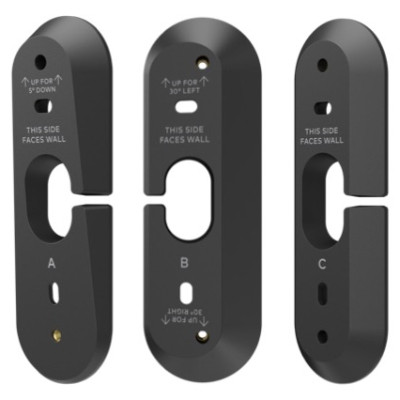



Video Doorbell Wedge Mount Kit for ADC-VDB770, Four Extra Angles
SKU ADC-VDBA-WMK Model ADC-VDBA-WMK
- Fast shipping from four branches
- 30-day returns on unopened products
The ADC-VDB770 ships with brackets at 0, 15 and 30 degrees. When the door sits in a perpendicular wall, or the bottom of frame is cutting off packages on the step, none of those is enough. This kit adds four more positions.
Built for the installer
The extra wedges are D at 45 degrees left or right, E at 5 degrees down, F at 5 degrees down with 15 degrees left, and G at 5 degrees down with 15 degrees right. The 45-degree pan handles the classic recessed entry where the only mounting surface faces away from the door. The 5-degree down options push the vertical field toward the ground to pick up smaller packages.
One thing to remember on the account side: after fitting a new mounting bracket, the correct wedge type has to be selected in the doorbell settings. Skipping that step leaves the image geometry wrong even though the hardware is right.
Key features
- 45-degree left or right pan for doors set into perpendicular or recessed walls
- 5-degree down options that extend the vertical view to the ground for smaller packages
- Four wedge types on top of the three brackets already in the doorbell box
- Solves awkward entries without relocating the doorbell or re-pulling wire
System requirements
For the Alarm.com ADC-VDB770 Video Doorbell. After installing a new mounting bracket, select the matching wedge type in the doorbell settings so the image geometry is correct.
Specifications
| SKU | ADC-VDBA-WMK |
|---|---|
| Brand | Alarm.com |
| Compatibility | Alarm.com ADC-VDB770 Video Doorbell |
| Form factor | Doorbell wedge mount kit |
| Wedges included | D: 45 degrees left or right. E: 5 degrees down. F: 5 degrees down, 15 degrees left. G: 5 degrees down, 15 degrees right |
| Brackets in doorbell box | A: 0 degrees. B: 15 degrees left or right. C: 30 degrees left or right |
| Purpose | Extreme left and right pan for perpendicular walls, and downward tilt to reduce the bottom blind spot |
Documents and resources
FAQs
Which angles does this kit add?
Do I need to change a setting after fitting a new wedge?
When is the 45-degree wedge needed?
More in Video Surveillance
All Video Surveillance-
Alarm.com
Alarm.com | Wedge Mount Kit for ADC-VDB750 Video Doorbell | ADC-VDBA-750-WMK
ADC-VDBA-750-WMK -
Alarm.com
Alarm.com | Wedge Mount Kit for ADC-VDB780B Wireless Video Doorbell, Tilt & Pan | ADC-VDBA-780B-WMK
ADC-VDBA-780B-WMK -
Alarm.com
Alarm.com | Power Module for ADC-VDB770 Video Doorbell, AC or DC | ADC-VDBA-PM
ADC-VDBA-PM -
Alarm.com
Alarm.com | Video Doorbell Temperature Collar, Extends ADC-VDB770 to -40C | ADC-VDBA-TC
ADC-VDBA-TC