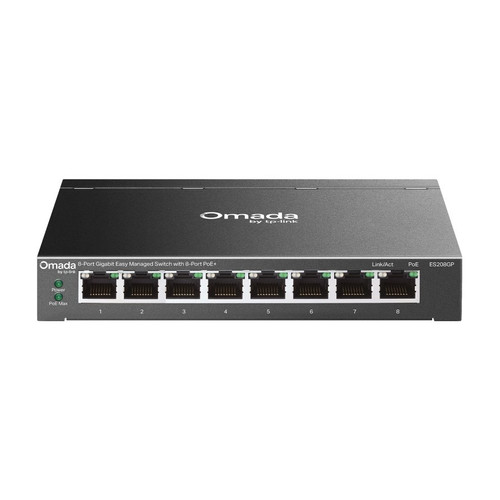


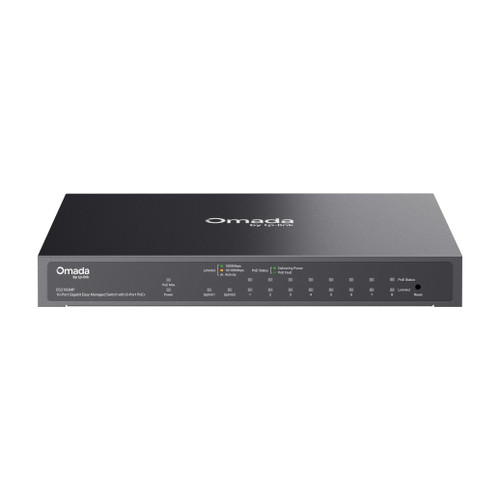


Omada 10-Port Gigabit Easy Managed PoE+ Switch, 8 PoE+ Ports, 123 W, Gigabit SFP/RJ45 Combo
SKU TPL-ES210GMP Model ES210GMP
- 8 Gigabit PoE+ ports from a 123 W budget, plus an RJ45 port and a combo SFP/RJ45
- Fast PoE and Perpetual PoE keep cameras up through a switch reboot
- PoE reach to 250 m, VLANs and port isolation in a fanless metal case
- Adopts into Omada with zero-touch provisioning, or runs standalone by web GUI
- Fast shipping from four branches
- 30-day returns on unopened products
Product highlights
- Ports8 PoE+ plus RJ45 and combo
- PoE123 W, 802.3af/at
- RangePoE to 250 m
- MountDesktop or wall
- Size8.2 x 4.9 x 1.0 in
The Omada ES210GMP is a 10-port Gigabit Easy Managed switch with eight PoE+ ports and a 123 W budget, enough for a typical 8-camera or AP job. A combo SFP/RJ45 port handles the uplink.
Built for 8-camera and wireless jobs
Eight ports deliver 802.3af/at PoE+ at up to 30 W each from the 123 W budget, one more RJ45 port is data only, and the combo SFP/RJ45 port takes either copper or a fiber uplink. Fast PoE and Perpetual PoE keep devices up through a switch reboot, and PoE reach extends to 250 m at a reduced 10 Mbps link. The fanless metal case sits on a desk or mounts on a wall.
Key features
- 8 PoE+ ports, 123 W total: 802.3af/at at up to 30 W per port for cameras, APs and phones
- Gigabit SFP/RJ45 combo port: copper or fiber uplink, plus one data-only Gigabit RJ45 port
- Fast PoE and Perpetual PoE: devices power up early and stay powered through a switch reboot
- PoE reach to 250 m: long camera runs at a reduced 10 Mbps link speed
- Fanless metal case: silent in use, desktop or wall mount, with a physical security lock slot
System requirements
Uses the included 53.5V DC external power adapter. Powered devices must be 802.3af or 802.3at compliant. The SFP port needs a separate Gigabit SFP module. Centralized management needs an Omada Cloud-Based Controller (built-in 5.15.22 or later), Hardware Controller or Software Controller (5.15.20 or later); zero-touch provisioning needs the cloud controller. Without a controller the switch runs standalone from its web interface.
Specifications
| SKU | TPL-ES210GMP |
|---|---|
| Brand | TP-Link |
| Form factor | 10-port Gigabit Easy Managed PoE+ switch, desktop or wall mount |
| Communication | Ethernet / IP |
| Power input | External adapter, 53.5V DC / 2.43A (included) |
| Power consumption | 141.46 W max at 220V with 123 W of PoE load |
| Management | Easy Managed |
| PoE | 802.3af PoE |
| PoE | 802.3at PoE+ |
| Port speed | Gigabit |
| Works with | Omada |
| Ethernet ports | 8 x Gigabit PoE+ RJ45, 1 x Gigabit RJ45, 1 x Gigabit SFP/RJ45 combo |
| SFP slots | 1 x Gigabit SFP (combo with RJ45 port) |
| PoE budget | 123 W total, 30 W max per port |
| PoE features | Fast PoE, Perpetual PoE, PoE Auto Recovery (standalone mode), IntelliRecover (controller mode), up to 250 m PoE reach (link drops to 10 Mbps) |
| Switching capacity | 20 Gbps |
| Packet forwarding rate | 14.88 Mpps |
| MAC address table | 8K |
| Jumbo frame | 15 KB |
| VLANs | 802.1Q tag VLAN, up to 32 VLAN groups (4K VID) |
| L2 features | Static link aggregation (up to 4 groups, 6 ports per group), loopback detection, 802.3x flow control, port mirroring (one-to-one, many-to-one), port statistics, LLDP, 802.3az EEE |
| Security | Port isolation, storm control (broadcast, multicast, unknown unicast), physical security lock slot |
| Controller management | Omada Cloud-Based Controller (built-in 5.15.22 or later); Hardware and Software Controller (5.15.20 or later); Omada app |
| Communication notes | Web GUI, DHCP client, cable diagnostics, LLDP, IGMP v1/v2/v3 snooping with fast leave, port-based/802.1p/DSCP QoS with 8 queues and WRR, ONVIF in controller mode |
| Cooling | Fanless |
| Surge protection | ±6 kV common mode on Ethernet ports |
| Mounting | Desktop or wall mount |
| Dimensions | 8.2 x 4.9 x 1.0 in (209 x 126 x 26 mm) |
| Operating temp | 32°F to 104°F (0°C to 40°C) |
| Operating humidity | 10 to 90% RH, non-condensing |
| Compliance | FCC, CE |
| Package contents | ES210GMP, power adapter, power cord, mounting feet, installation guide |