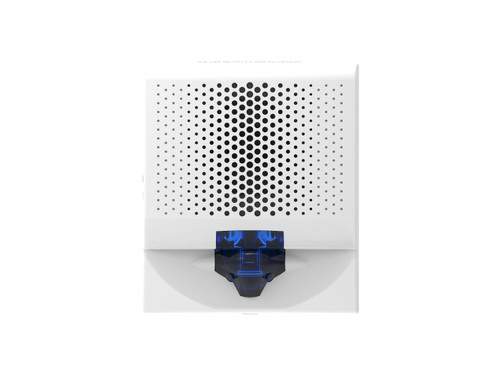



Genesis LED G4 Wall Mount Mass Notification Strobe, White with Blue Lens
SKU KD-G4VWN-B
- Fast shipping from four branches
- 30-day returns on unopened products
The Kidde Genesis LED G4 Mass Notification Strobe drops onto existing NAC circuits at just 28 mA DC draw, putting more devices per loop before you reach for a booster power supply. Blue lens provides the visual distinction mass notification systems require, and the ultra-low-profile 1.62" depth keeps it tight to the wall on commercial installs.
Built for the commercial fire alarm installer
Genesis LED G4 strobes are backwards compatible with legacy Xenon Genesis devices on the same circuit and within the same field of view. That means you can phase in LED upgrades without ripping out working strobes on the rest of the loop. Mounts to standard 2-gang or 4-inch square electrical boxes (minimum 1.5" deep) using the GRSW room side wiring plate, which allows full pre-wiring before the device goes on. UL listed (S218, S5389), FM Approved, and FCC certified.
Key features
- Ultra-low current draw: 28 mA DC / 36 mA VFWR across all lens colors and candela settings - maximizes devices per NAC circuit
- Backwards compatible with legacy Xenon Genesis strobes on the same circuit
- Low-profile design: just 1.62" from the wall surface
- Field-visible candela setting accessible under cover and visible through a side window after installation
- Pre-wire capable: GRSW room side wiring plate (ordered separately) allows complete wiring before device mounting
- Synchronization with Kidde CC Series Signal Modules, Booster and Auxiliary Power Supplies, and Intelligent and Conventional Control Panels (20 ohm max loop resistance)
System requirements
Requires a Kidde-compatible NAC circuit providing 16 to 33 VDC or 16 to 33 VFWR. Mounts with the GRSW room side wiring plate (ordered separately in packs of 10). Optional G4TW (white) or G4TR (red) trim plates available for finished appearance.
Specifications
| SKU | KD-G4VWN-B |
|---|---|
| Brand | Kidde Commercial |
| Form factor | Wall mount strobe, low-profile (1.62" depth) |
| Light output | 30 cd (blue lens) |
| Operating voltage | 16 to 33 VDC, 16 to 33 VFWR |
| Current draw | 28 mA (DC), 36 mA (VFWR) |
| Flash rate | 1 fps |
| Lens color | Blue |
| Housing color | White (RAL 9002) |
| Cover marking | None |
| Dimensions | 4.95 x 5.78 x 1.62 in (W x H x D) |
| Wire size | 12 to 18 AWG |
| Compatible electrical boxes | 2-gang, 4-inch square (min 1.5" deep) |
| Mounting | GRSW room side wiring plate (ordered separately) |
| Synchronization | 20 ohm max between devices; Kidde CC Series Signal Modules, Booster/Auxiliary Power Supplies, Intelligent and Conventional Control Panels |
| Operating temp | 32 to 122°F (0 to 50°C) |
| Operating humidity | 0 to 93% noncondensing |
| Storage temp | -40 to 158°F (-40 to 70°C) |
| Compliance | UL (S218, S5389), FM Approved, FCC, RoHS (2011/65/EU) |
| Trim plates | G4TR (red), G4TW (white) - ordered separately |
Documents and resources
FAQs
Can I mix Genesis LED strobes with legacy Xenon strobes on the same NAC circuit?
What mounting box does this strobe require?
Does the blue lens affect current draw compared to other lens colors?
What synchronization sources work with Genesis LED G4 Mass Notification strobes?
How do I change the candela setting after installation?
More in Kidde Commercial
All Kidde Commercial-
Kidde Commercial
Kidde | Genesis LED G4 Wall Mount Mass Notification Strobe, White, Green Lens | G4VWN-G
KD-G4VWN-G -
Kidde Commercial
Kidde | Genesis LED G4 Wall Mount Mass Notification Strobe, White with Red Lens | G4VWN-R
KD-G4VWN-R -
Kidde Commercial
Kidde | Genesis LED G4 Mass Notification Wall Mount Strobe, White, Amber Lens, 75 cd | G4VWN-A
KD-G4VWN-A -
Kidde Commercial
Kidde | Genesis LED G4 Wall Mount Mass Notification Strobe, White with Blue Alert Lens | G4VWA-B
KD-G4VWA-B -
Kidde Commercial
Kidde | Genesis LED G4 Wall Mount Mass Notification Speaker-Strobe, White, Blue Lens | G4SVWN-B
KD-G4SVWN-B